Key takeaways
- A design system is the shared source for the design of digital products, meaning a website or app: core values such as colors and fonts, ready-made building blocks such as buttons and page sections, and the rules for what applies when.
- It goes further than brand guidelines and a style guide. Those describe the brand and its look and feel, while the design system also delivers the building blocks. For a website of manageable size, a style guide is often enough.
- The link between design and implementation is design tokens: named values that are used the same way everywhere, such as “text-color-primary” for the color of headings or “spacing-xl” for a spacing step.
- For mid-sized companies, a design system has to be lean: as much as your website and your team really need, maintained without a dedicated department.
- With us, it is built together with your website in Webflow.
What is a design system?
A design system is the binding collection of foundations, building blocks, and rules that makes a website or app look and work the same everywhere. It translates the brand into the language of digital products and answers two questions at once: What does our website look like? And how do we build new pages without designing from scratch every time?
The key word is system. Almost every website has individual templates. They only become a system when all the parts are built from the same core values and a change in one place carries through everywhere.
Design system, style guide, and component library
- Brand guidelines: rules for the brand (logo, colors, fonts, imagery, tone of voice). This way, everyone knows what applies.
- Style guide: a page in the web project that shows all the styles of the website (fonts, colors, spacing, buttons, form elements), such as the style guide in Client-First. This keeps a website of manageable size consistent.
- Component library: ready-made building blocks in a tool, such as buttons, cards, and forms in Figma or Webflow. This speeds up design and implementation.
- Design system: all of the above, plus design tokens, patterns for entire pages, and rules for maintenance and changes. This keeps website and app consistent over time, even when many people build on them.
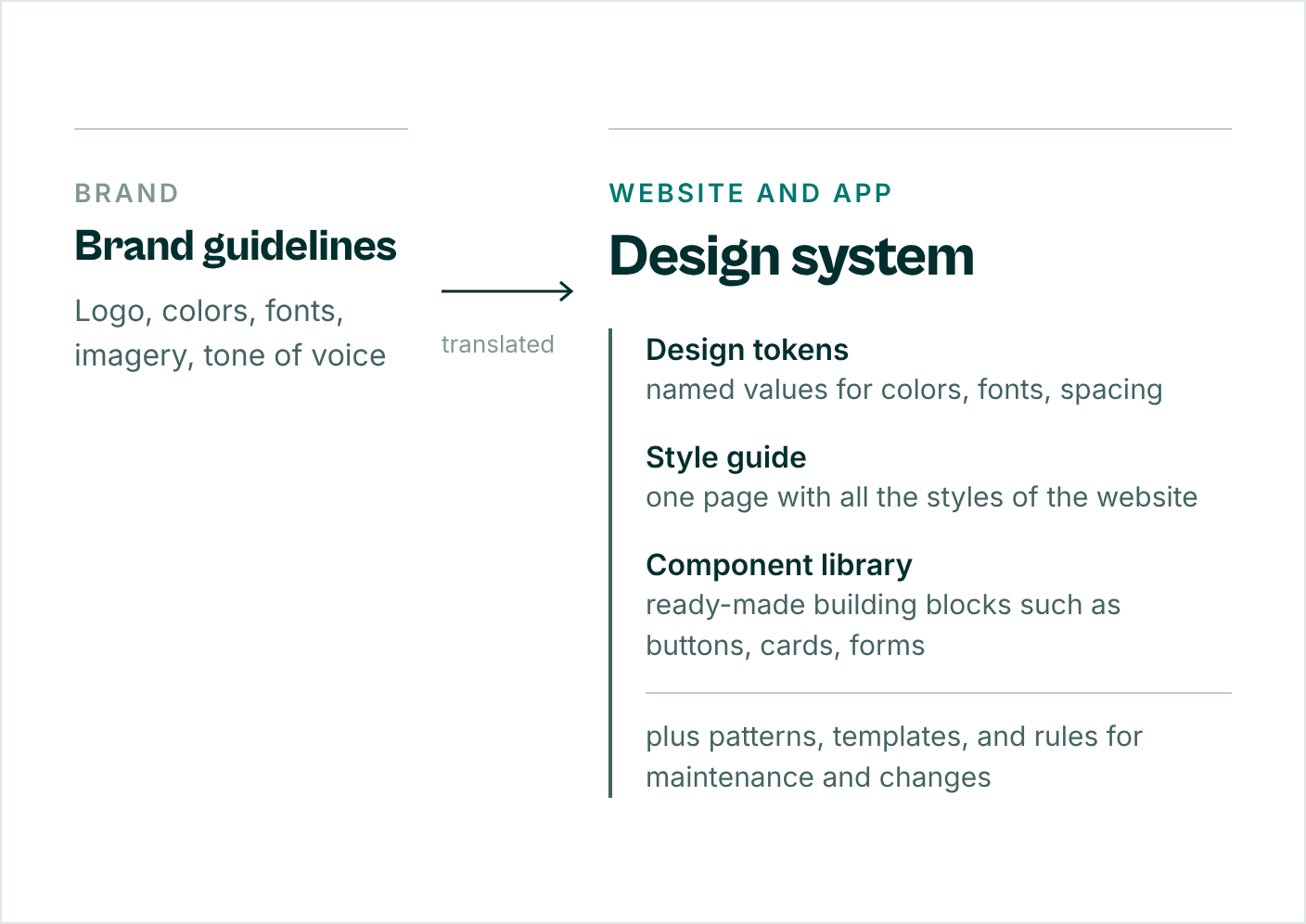
In short: Brand guidelines and style guides describe; a design system delivers. In everyday use, however, a brand manual is often called a style guide too. Our article Creating brand guidelines shows how good brand rules are structured.
What belongs in a design system?
A design system for a website has six building blocks. Not every website needs all of them in the same depth, but none should be missing.
- Principles: How should the website come across, based on the brand? Three to five sentences against which every design decision can be measured.
- Design tokens: named values for colors, fonts, sizes, spacing, radii, and shadows, from the palette down to the individual building block.
- Components: reusable building blocks such as buttons, cards, forms, navigation, and quotes, each with its variants.
- Patterns and templates: entire sections, page types, and screens, such as the homepage, an article, or a landing page.
- Content rules: tone of voice, form of address, spelling, and imagery. A website only looks consistent when the copy fits together too.
- Documentation and maintenance: where everything lives (for example, the brand guidelines and the website's style guide), who approves changes, and how new building blocks are added.
Design tokens: The layer between brand and code
Design tokens are named values that capture a design decision. Instead of “#0A2926”, the system says “brand green”; instead of “32 pixels”, it says “spacing large”. This way, design and implementation speak the same language.
Good systems organize tokens in three levels:
- Primitives (base values): the complete color palette, the font sizes, the spacing steps, such as “Teal 950” or “spacing 32”. They only say what exists. They are not used directly in the design.
- Semantic tokens (meanings): “text primary”, “background highlight”, “border subtle”. They say what a value is for and point to a primitive.
- Component tokens (component values): values for a single building block, such as “button background” or “card padding”. They point to semantic tokens. This lets you adjust one building block without changing the meaning for everything else.
A chain then looks something like this: “button background” → “surface accent” → “Teal 950”.
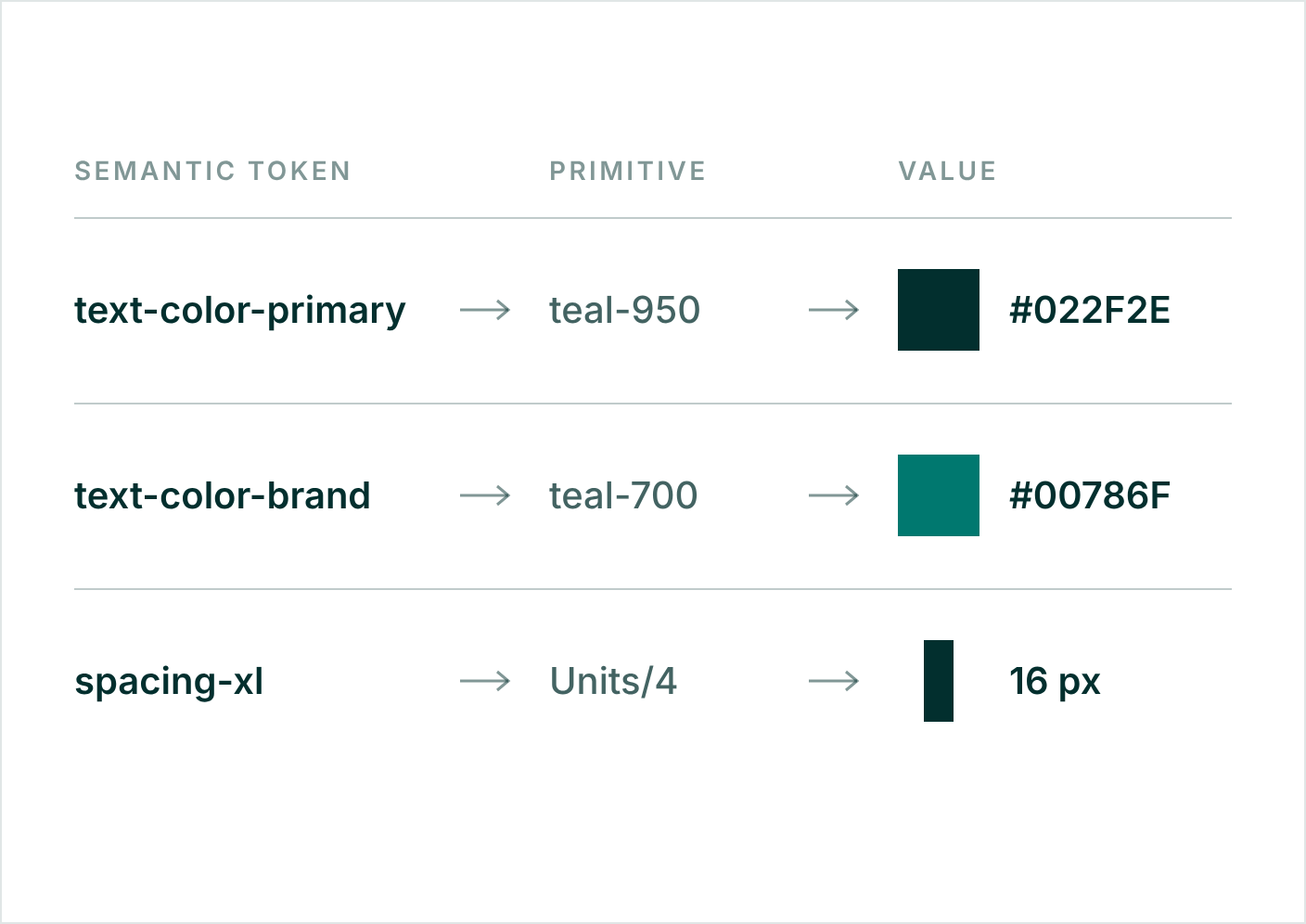
The advantage shows with every change. If the body text should be stronger, you change one token, and every page follows. A dark mode becomes simple too: The semantic tokens stay, only the primitives behind them switch.
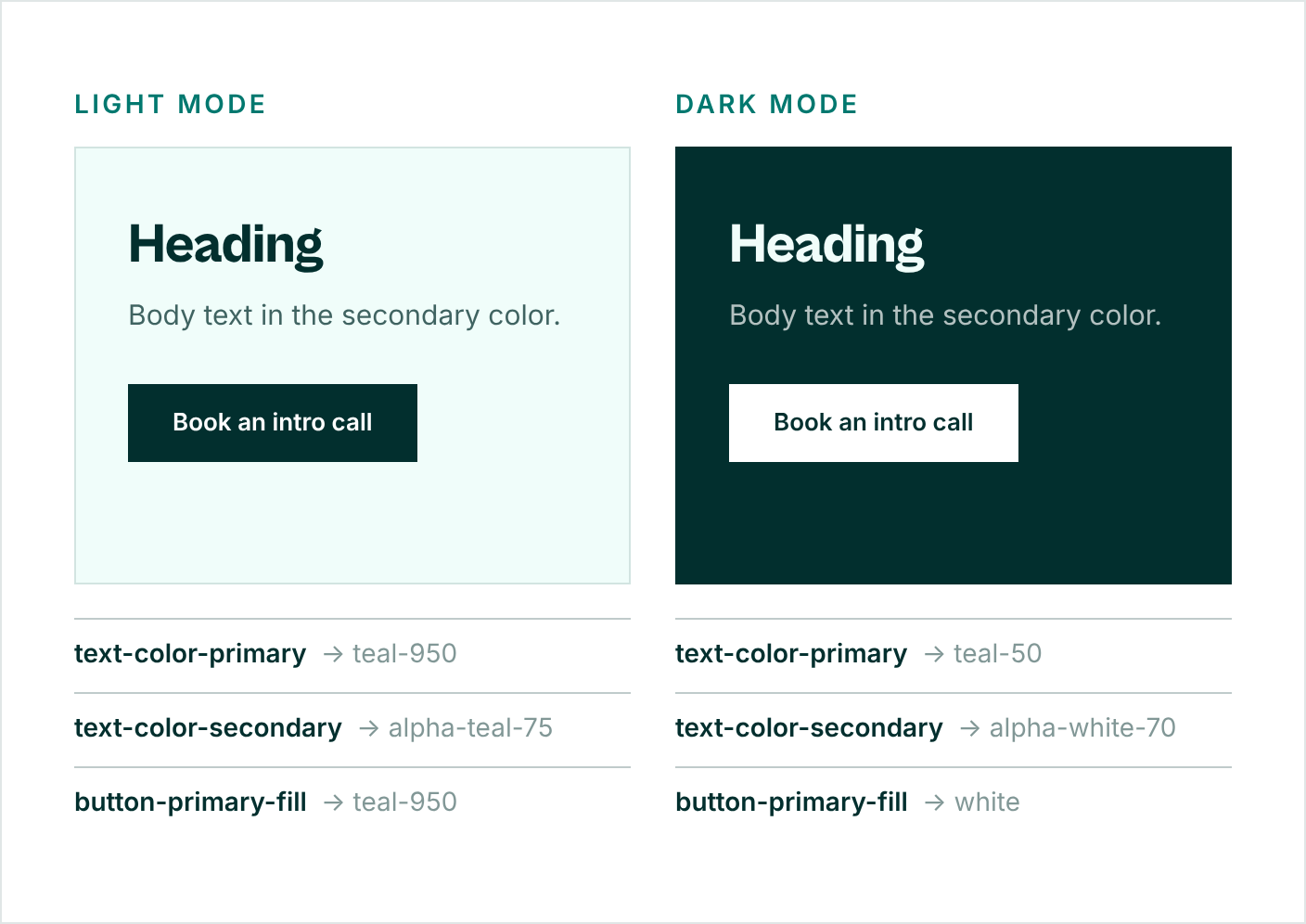
This website is built the same way. Colors, spacing, and font sizes come from variables in Webflow. Depending on the mode, the semantic tokens point to different primitives:
- text-color-primary (headings and important text): Teal 950 in light mode, Teal 50 in dark mode.
- text-color-secondary (body text): Teal 950 at 75% opacity in light mode, white at 70% opacity in dark mode.
- bg-media (surface behind cut-out images): black at 10% in light mode, white at 10% in dark mode.
Design systems for mid-sized companies: Lean, not enterprise-scale
The well-known examples come from large corporations such as Atlassian or Google. There, a dedicated team maintains a large library for many products. A mid-sized company doesn't need that at this scale.
For mid-sized companies, the situation is different: one brand, one website, one marketing team, plus agencies and service providers. Here, a design system has to do three things above all:
- Connect brand and website: Corporate design and website use the same values. If you adjust the brand color, you don't have to hunt for it in five files.
- Make your team self-sufficient: New pages and landing pages are built from ready-made building blocks, without having to ask an agency every time.
- Work without a dedicated department: a few well-named building blocks instead of a library nobody can keep track of, and clear responsibility for changes.
Not every website needs a full design system for this. For a site of manageable size that a small team maintains, a style guide with all the styles it is built from is often enough. A design system pays off as soon as many page types, several languages, an app, or several teams come into play.
Design systems in Webflow
Webflow is well suited to bringing a design system straight into the website. The tools for it are built in:
- Variables hold the design tokens: colors, sizes, spacing, fonts. With modes, you control light and dark appearances from the same semantic tokens.
- Components with properties turn recurring elements into building blocks that your team fills with its own copy without changing the design.
- A fixed class system (Client-First, in our case) keeps the design easy to follow, even years later.
- The CMS connects content such as projects, articles, or team members with the templates.
The result: Your team maintains the website itself, and it still stays on brand. How we build Webflow websites is explained on Webflow websites for your brand.
Design systems and AI
AI tools generate copy, images, and layouts in seconds. Without clear rules, the result is arbitrary. With a design system, they get what they need: named colors and fonts, fixed building blocks, rules for tone of voice and imagery. The clearer the system, the more likely the result fits the brand.
In other words: AI doesn't make brand design obsolete. AI makes weak brand design obsolete. The AI brand check shows in five minutes how well prepared your brand is.
Five steps to a design system
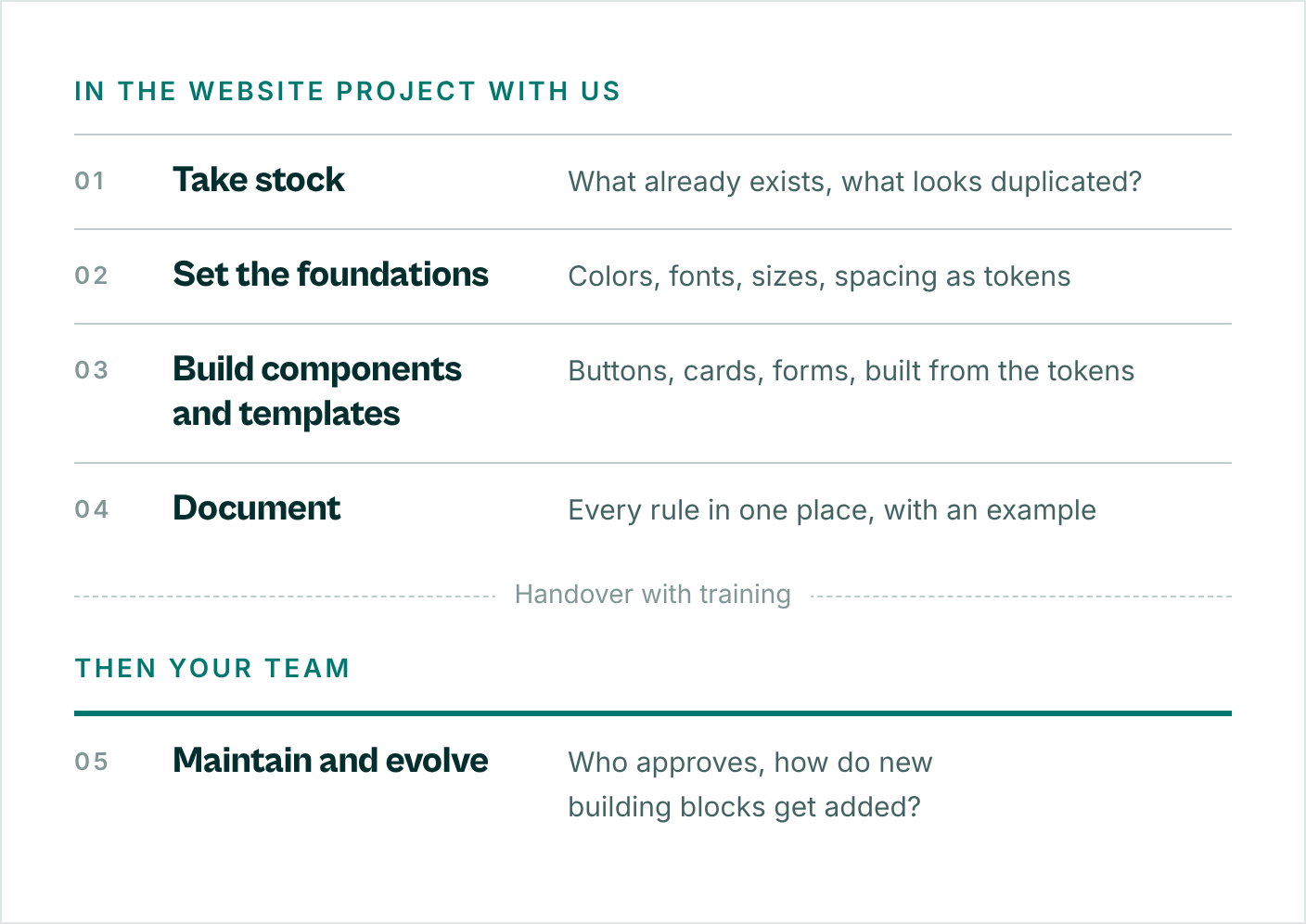
- Take stock: Gather what already exists on your website and app: page types, sections, buttons, forms. Mark where the same element looks different, such as three shades of green or four kinds of buttons. This list shows where the system needs to take effect first.
- Set the foundations: Colors, fonts, sizes, and spacing become design tokens. First the primitives, then the semantic tokens such as “text primary” or “background light”.
- Build components and templates: The tokens become components and templates: buttons, cards, forms, navigation, sections, and full page templates. Where a building block needs its own values, it gets component tokens. Start with what your team needs most often.
- Document: Every rule lives in one place, with an example: which building block is for what, what is allowed and what isn't. With us, the brand rules live in the living brand guide, and the website rules in the documented class and variable system of the Webflow project.
- Maintain and evolve: Decide who approves changes and how new building blocks are added. A design system is never finished, because new pages, features, and campaigns keep coming.
How we work: Steps one to four are part of our website project, from kickoff and structure through design and build to the handover with training. Your team takes over the fifth step: You maintain the site yourselves, without a maintenance contract.
What does a design system cost?
That depends on the scope. A lean system for a website is a different undertaking from a component library for a website and an app. The effort depends mainly on four questions:
- Is a style guide enough, or do you need a design system? And how many page types, building blocks, and templates should it cover?
- Is the brand already in place, or do colors, fonts, and rules need to be clarified first?
- Is the website being built from scratch, or is an existing one being rebuilt?
- Who maintains the system afterward: your team or a service provider?
That's why a reliable price starts with a look at what you already have.
Frequently asked questions
When is a design system worth it?
As soon as your website grows: many page types, several languages, several people building on it, or an app on top. At the latest when the same elements look different in different places or every new page starts from scratch. For a website of manageable size, a style guide is often enough. You don't need your own product team for either.
What is the difference between a design system and a style guide?
A style guide shows on one page which styles a website has: fonts, colors, spacing, buttons, form elements. Webflow projects built with Client-First come with such a page, including our own. A design system goes further: It derives the styles from the brand, sets them up as design tokens, adds components and templates, and defines who changes what. So the style guide is part of the design system, not the whole thing. For a website of manageable size, it is often enough on its own.
What are design tokens?
Named values for design decisions such as colors, font sizes, and spacing. Instead of a color code, the system uses a name like “brand green”. If you change the value, it changes everywhere the token is used. Three levels are common: primitives for the base values, semantic tokens for meanings, and component tokens for individual building blocks.
How much work is maintenance?
That depends on how many page types and building blocks the system covers. What matters is clear responsibility: one person or a small team approves changes and adds new building blocks. For websites we build in Webflow, the class and variable system is documented, and your team gets training at handover.
Do we need Figma for this?
Not necessarily. Figma is a widely used tool for designing and collecting building blocks. What matters more is that every rule has one binding source. For a website in Webflow, variables and components take on this role.
Does a design system work with Webflow?
Yes. Variables map the design tokens, components map the building blocks, and modes control light and dark variants. Our own website is built this way.
How long does it take to set up?
That depends on the scope. With us, it is built together with the website. We clarify how long that takes in the intro call, once we know what you already have.
Your next step
Want to build your design system together with your website? Book an intro call: 30 minutes, free of charge. If you'd like to test us first, start with a starter project for a fixed €500: one deliverable to your guidelines.
Want to know where your brand stands first? The AI brand check covers strategy, identity, application, and operations in 15 questions, free of charge and with instant results.